MAXORI Booking Planner
Your reservations, rooms and numbers in one simple planner
A booking and operations planner for vacation rentals, apartments, B&Bs and guesthouses managing several properties or rooms. Calendar, arrivals, guest payments, expenses and performance — without an oversized channel-management platform.
- Free 14-day trial
- No credit card needed
- In 5 languages
Already using another planner? Bring your existing reservations with you via a CSV file.
Why operators choose it
Less chasing, more clarity
Every stay in one place
Bookings from Booking.com, Airbnb, your website or the phone all live in the same calendar and list.
Today is always clear
Arrivals, departures, stays and free rooms for the day — ready to print for your team.
Know who has paid
Record payments and refunds per reservation and see the balance due at a glance.
Real numbers, not guesses
Occupancy, ADR, RevPAR, commissions, expenses and net profit from the data you already enter.
Product video
See MAXORI in action
A short tour of the real Booking Planner: calendar, reservations, guest payments, performance and profit.
No sound needed: subtitles in 5 languages · Real Planner screens with fictitious demo data.
No credit card needed
Features
Everything accommodation operators use every day
The same complete Planner on every plan. Plans differ only by the number of properties.
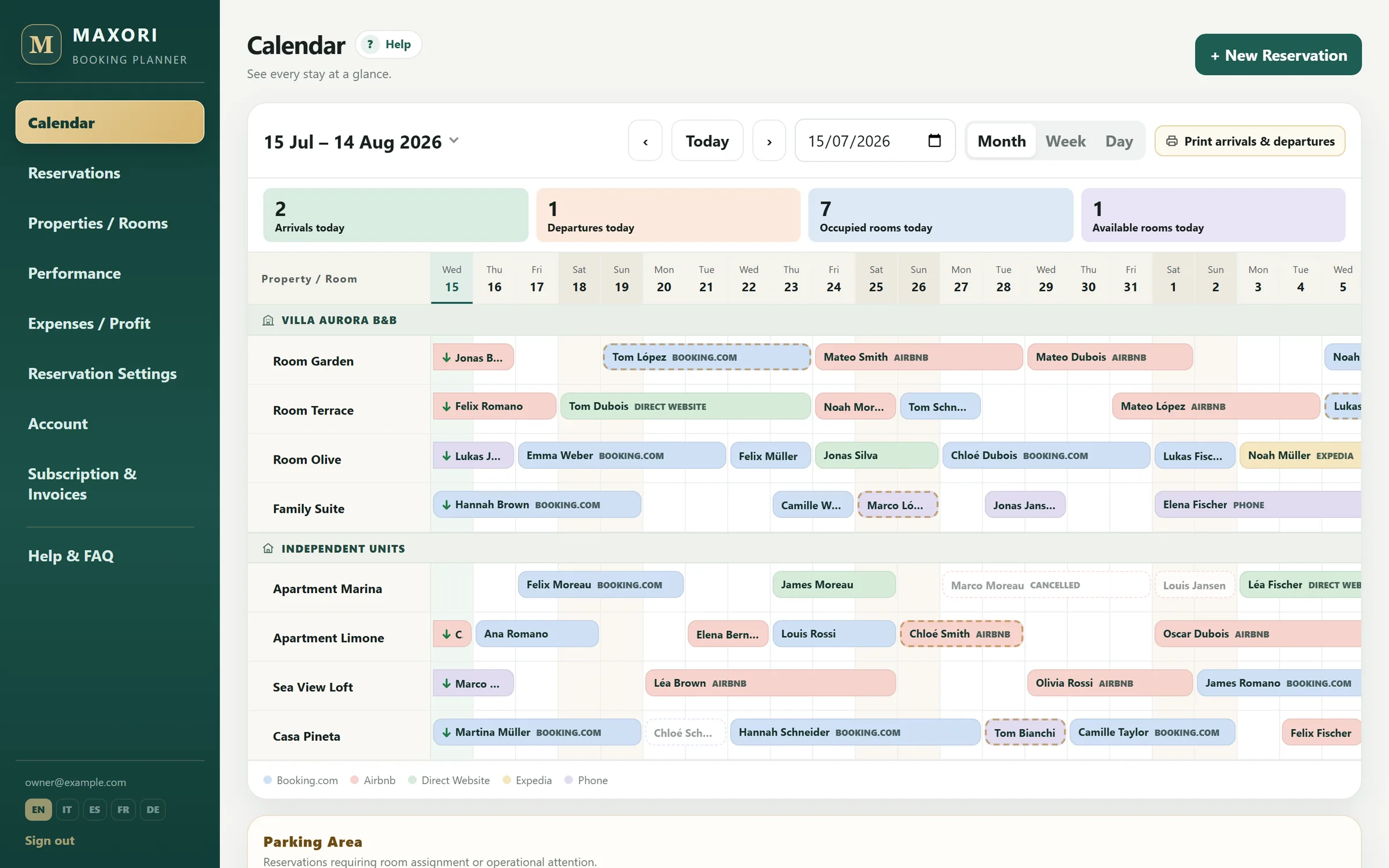
Calendar: Month, Week and Day
One row per room, stays coloured by booking channel, rooms grouped by establishment.
Month, Week and Day views, with today's arrivals, departures and free rooms above the grid.
- Jump to today or any date
- Click a free day to create a booking
- Status arrows for checked-in and checked-out guests
Reservations
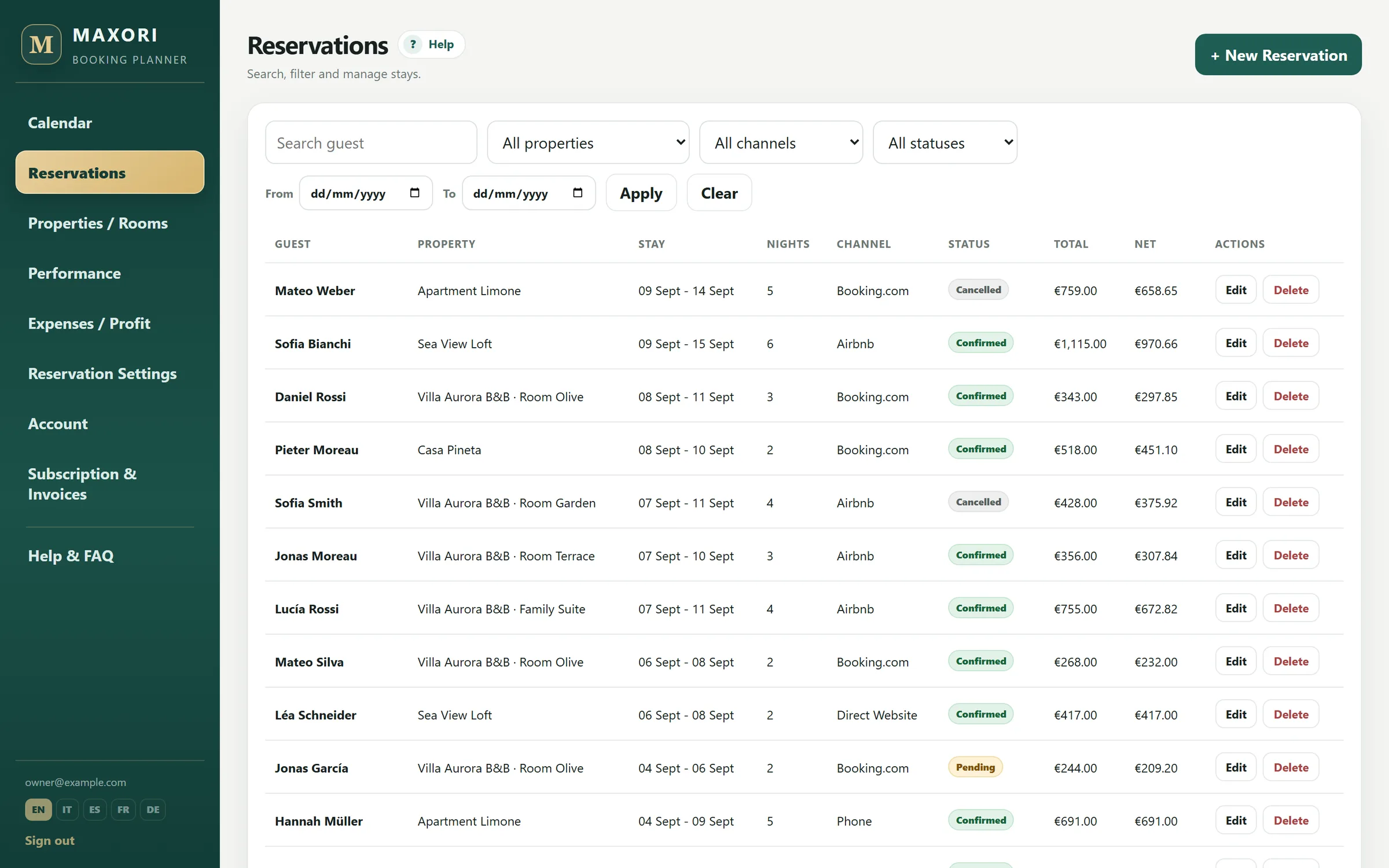
Guest, nationality, room, guests, dates, channel, status, amount, extras and notes. Switching from another planner or a spreadsheet? Import your existing reservations from a CSV file, without retyping them one by one.
Every stay in one list: search by guest, filter by property, channel, status and dates.
- Automatic check for overlapping bookings
- Pending, Confirmed, Checked-in, Checked-out, Cancelled, No-show
- Activity history of every change
- CSV import with a preview before anything is saved
Arrivals & departures
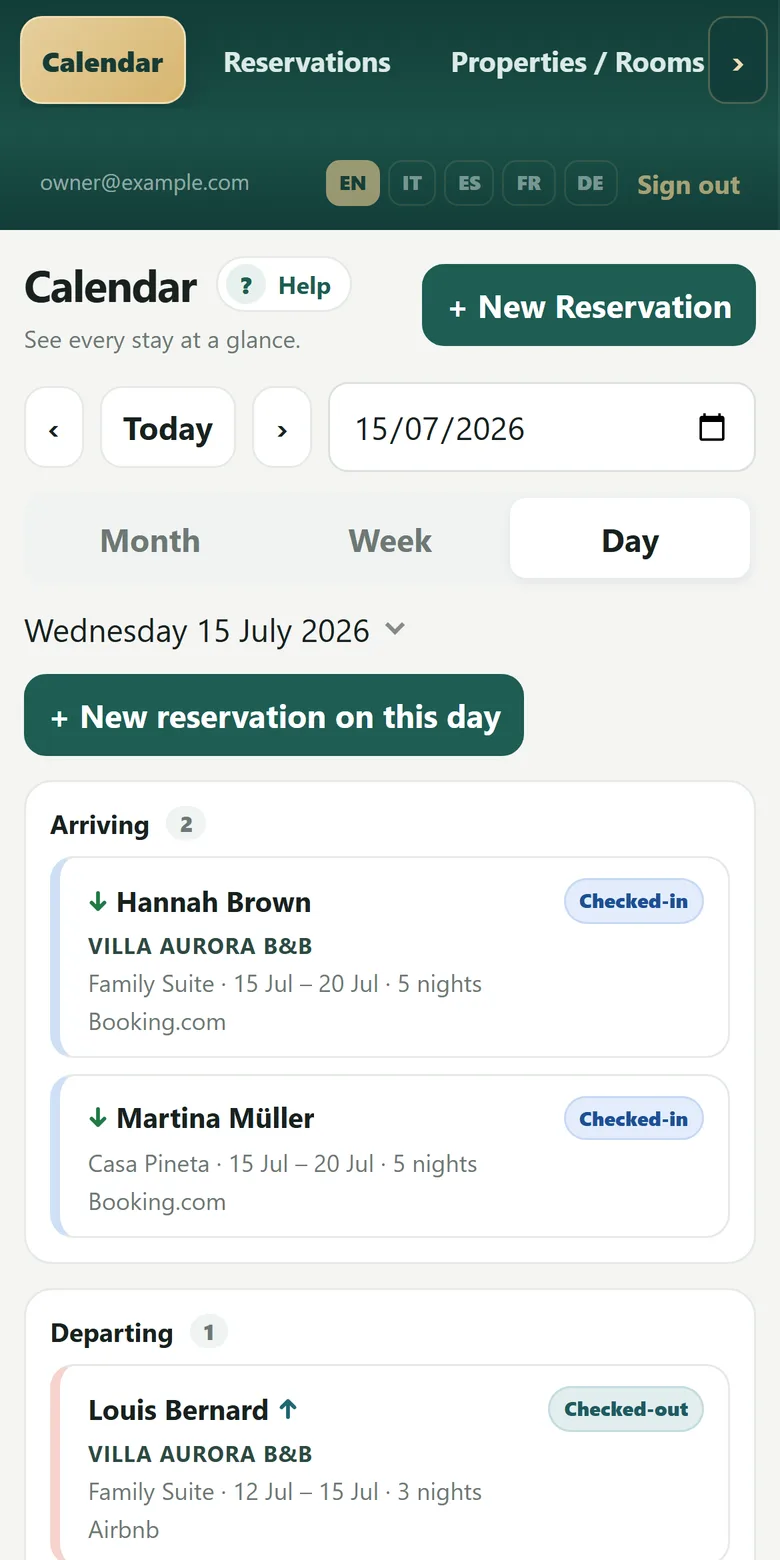
The Day view lists who arrives, leaves, stays and comes next.
On a phone the Calendar opens in Day view: who arrives, who leaves and who is staying, with each guest's room and channel. Add a booking in a few taps.
- Today's arrivals, departures, occupied and free rooms
- Printable sheet without amounts
- Parking area for bookings still without a room
Channels, commissions and extras
Set your booking channels with their commission, and add extras such as cleaning or city tax.
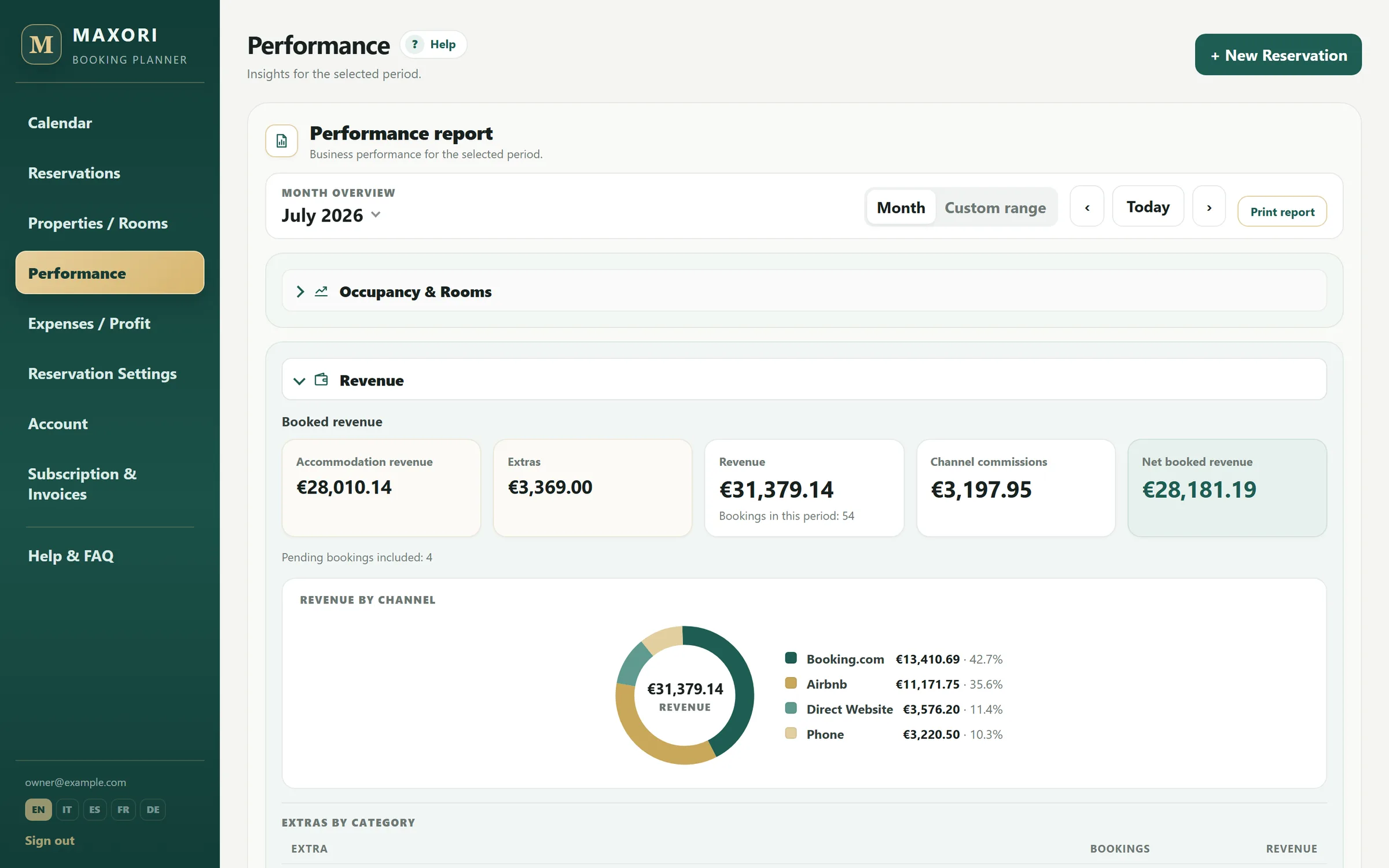
Revenue, extras and channel commissions, with the split by booking channel.
- Commission calculated and saved with each booking
- Extras as revenue or pass-through
- Currency: EUR, USD, GBP, CHF or SEK
Performance
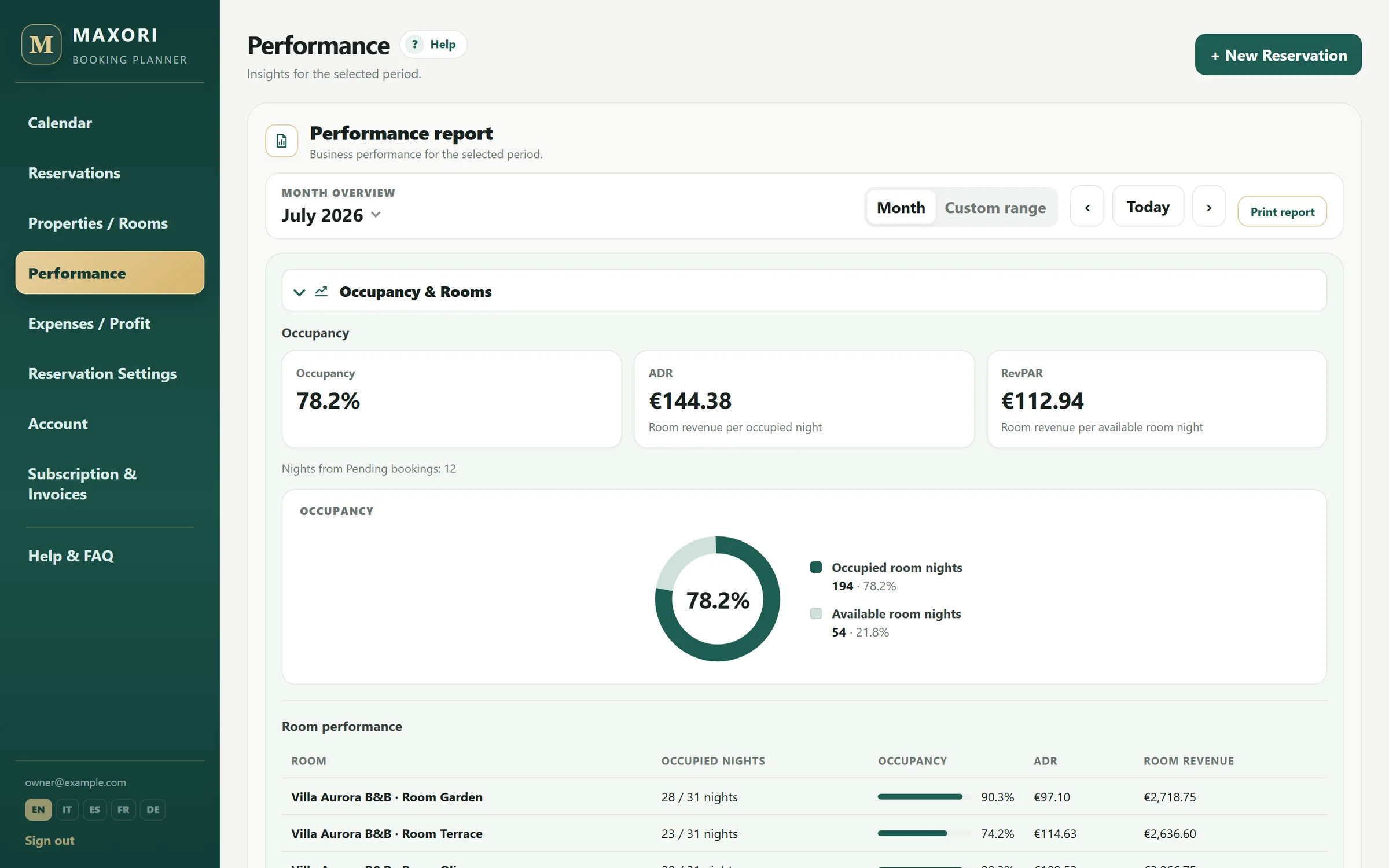
A monthly or custom-period report of how your business is doing.
Occupancy, ADR and RevPAR for any month or date range, room by room.
- Occupancy, ADR and RevPAR, per room
- Revenue and commissions by channel
- Guest insights and payment methods
Expenses & profit
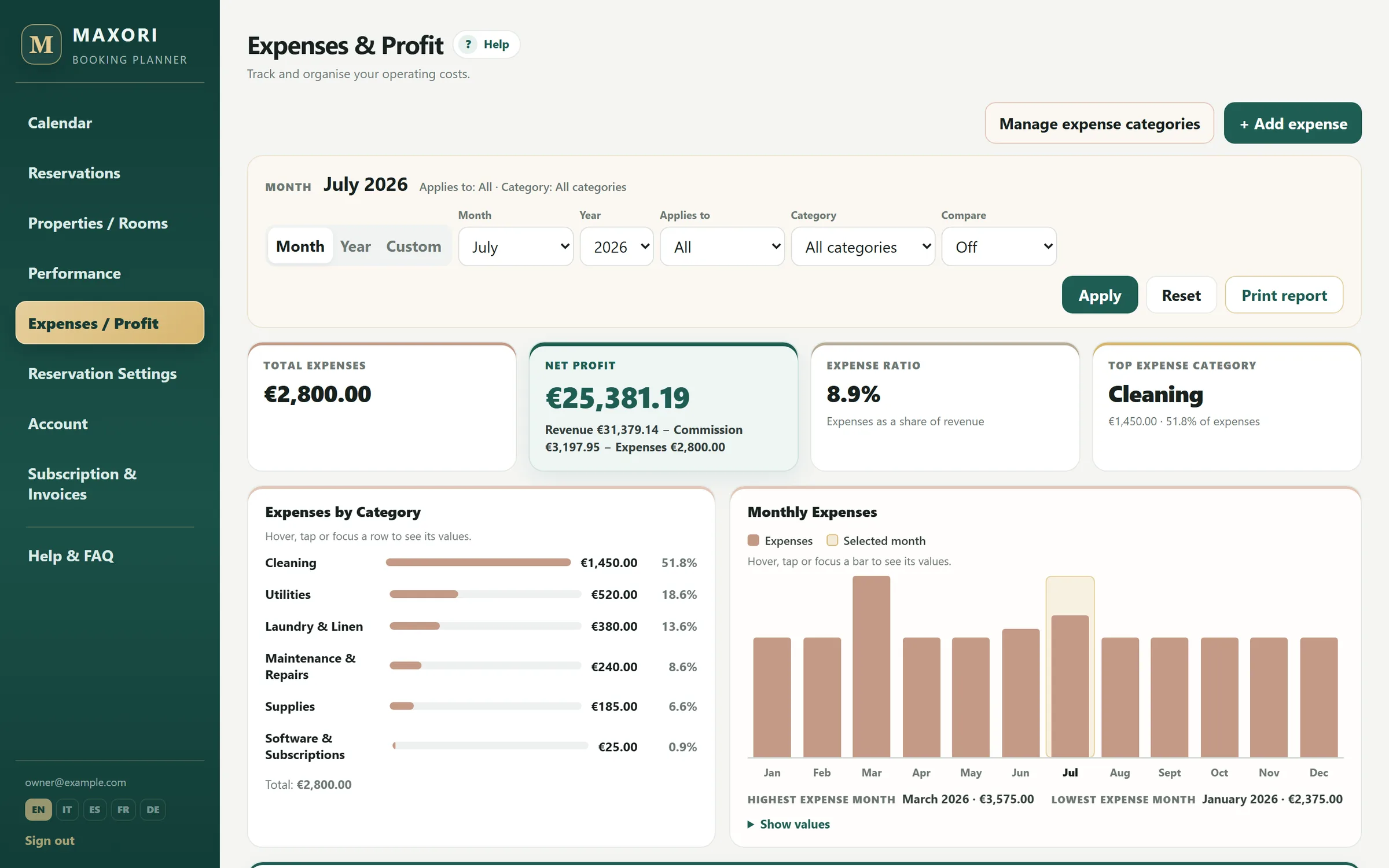
Record one-time, monthly or yearly costs for the business, an establishment or a unit.
Record costs by property or for the whole business and see net profit per period.
- Net profit and expense ratio
- Comparison with the previous period or year
- Upcoming expenses for the next 30 days
Guest payment tracking
Record each payment or refund you receive — cash, card, bank transfer or your own methods.
Properties & rooms
Apartments, rooms, holiday homes and guesthouse units, grouped into establishments.
Team access
Invite staff by email and give each person the right role.
Five languages, any device
English, Italian, Spanish, French and German — each person picks their own.
Real Planner screens with fictitious demo data.
Who it's for
Built for independent accommodation businesses
For operators who manage several units and want order and clear numbers — not a complex hotel system.
Vacation rentals
Holiday homes and seasonal apartments, from a few units to a whole portfolio.
Apartment managers
Several apartments, many stays, and a team to coordinate.
B&Bs
Rooms grouped under one establishment, with arrivals, extras and payments per stay.
Guesthouses
Day-to-day reservations and the numbers behind them, in one place.
Portfolios of every size
From a single property to larger portfolios, on one account.
A good fit if you…
- manage several properties / units — from a handful to a larger portfolio
- record bookings from several channels and want them in one calendar
- want revenue, payments, expenses and occupancy side by side
Not the right tool if you need…
- a channel manager that syncs availability and prices with Airbnb or Booking.com
- online payment collection from guests
- a full hotel PMS for a large property
How it works
From free trial to daily use in four steps
Start the free trial
Start your 14-day free trial from this page. No credit card.
Activate your account
Open the activation email and set your password. You are the owner of a real Planner account.
Use it with your own data
Add your properties, channels and a few reservations and see how your day looks.
Choose a plan
Pick the plan for your number of properties. The same account continues, with everything you entered.
Free 14-day trial
Try the real Planner for 14 days
The free trial is not a sandbox: it is a real MAXORI Booking Planner account, with every feature, for 14 days.
- No credit card required
- Your own real owner account
- All features, in all five languages
- Keep your data if you subscribe
Pricing
One complete Planner. Priced by the number of properties.
Every plan includes every feature. Choose 3-month or yearly billing.
Starter
Up to 5 properties / units
€169
per year
Save 15% compared with 3-month billing
Growth
6–11 properties / units
€239
per year
Save 15% compared with 3-month billing
Pro
12–20 properties / units
€299
per year
Save 17% compared with 3-month billing
Business
21–30 properties / units
€369
per year
Save 16% compared with 3-month billing
Custom
Managing more than 30 properties or units?
MAXORI can also support larger portfolios. Contact us for a custom plan tailored to your operation.
Prices in euro, VAT excluded. VAT is added where applicable.
Plans renew automatically at the end of each period. You can cancel the renewal at any time; access continues until the end of the period you have paid for.
Included in every plan
- Calendar: Month, Week and Day
- Reservations, channels and extras
- Arrivals & departures, printable
- Guest payment and refund tracking
- Performance: occupancy, ADR, RevPAR
- Expenses and net profit
- Team access with roles
- Five languages, built-in help
Team access
The right access for each person
Invite your staff by email. Each role opens only the areas it needs — and the rules are enforced by the system, not just hidden on screen.
Owner
Everything, including the subscription. One per account.
Manager
Runs the business: reservations, properties, performance, expenses and team.
Reception
Calendar and reservations, including guest payments. No financial reports.
Basic
Calendar and a read-only view of reservations.
Your data
Serious about access and data
Stored in the EU
Planner data is stored in the European Union (Frankfurt, Germany).
Separated per account
Each account's data is isolated at database level: no account can read another's.
Roles enforced by the system
What a role cannot do is refused by the database itself, not only hidden in the interface.
No guest card data
You record payments you have received; the Planner never processes guest card payments.
What is MAXORI Booking Planner?
An online planner for independent accommodation businesses. It keeps your reservations, calendar (Month, Week and Day), arrivals and departures, guest payments, expenses and performance figures together in one place. It runs in your browser at planner.maxoristudio.com. MAXORI sells the software only: it does not operate accommodations or take guest bookings or payments.
Who is it for?
Vacation rental operators, apartment managers, B&Bs, guesthouses and accommodation businesses, from a single property to larger portfolios. Published plans cover up to 30 properties / units; for more, MAXORI prepares a custom plan.
Is it a channel manager?
No. MAXORI Booking Planner does not connect to Airbnb, Booking.com or other portals and does not sync availability or prices. You record your reservations in the Planner, with their booking channel and commission, and it gives you one clear view of all of them.
How many properties can I manage?
It depends on the plan: Starter up to 5 properties, Growth 6–11, Pro 12–20, Business 21–30 properties / units. Managing more than 30? MAXORI can also support larger portfolios with a custom plan.
What happens if I reach my property limit?
The Planner shows how many properties you use against your plan limit. When you reach it, you cannot add new properties until you move to a larger plan. Nothing is deleted. Inactive properties also count towards the limit.
Which languages are supported?
English, Italian, Spanish, French and German. Each person chooses their own language, and the built-in help centre is available in all five.
How does the free trial work?
You start the free trial from this page and activate your account from the email you receive. For 14 days you use the real Planner as the owner of your own account, with every feature, and you can enter your own properties and reservations.
Do I need a credit card for the free trial?
No. The free trial requires no credit card and no payment details.
What happens after 14 days?
The free-trial access ends and the Planner tells you that your trial has ended. Your data is kept. To continue, choose a plan: the same account becomes your active subscription.
Will I lose my data if I subscribe after the free trial?
No. Your subscription is activated on the same account, so the properties, reservations and settings you entered during the free trial stay where they are.
Can I import reservations from the planner I already use?
Yes, if your current planner or booking software lets you export your reservations as a CSV file (if they are in Excel or Google Sheets, save them as CSV). In MAXORI, first create your properties and channels, then go to Reservations and choose Import CSV: select the file, match the columns and the names of your properties, channels and statuses, check the preview and confirm. Guest, property, dates, number of guests, channel, status, amount and notes are imported. Payments, extras and expenses are not: imported reservations show as unpaid until you record the payments. Errors, possible duplicates and overlapping dates are flagged before anything is saved. Up to 500 reservations per file. It is a one-time import, not a connection to your old software, and you can also do it during the free trial.
What billing periods are available?
3 months or 1 year. Yearly billing saves up to 17% compared with four 3-month periods. There is no monthly plan.
Does the subscription renew automatically?
Yes. Paid plans renew automatically at the end of each billing period.
Can I cancel the automatic renewal?
Yes, at any time.
What happens after I cancel?
Cancelling stops the next renewal. It does not end the period you have already paid for: you keep access until your subscription's end date.
Is VAT included in the prices?
No. Prices are shown in euro excluding VAT. VAT is added where applicable.
Can I change plan?
Yes. If your number of properties changes, you can move to the plan that fits — contact MAXORI and the plan is changed on your existing account, with your data unchanged. The owner sees the current plan and property usage on the Subscription & Invoices page.
Can I invite team members?
Yes. The owner or a manager invites people by email from the Account page and chooses their role. Roles can be changed and access can be disabled or removed at any time.
What roles exist?
Owner (everything, including the subscription), Manager (everything except the subscription), Reception (calendar and reservations, including guest payments) and Basic (calendar and a read-only view of reservations).
Does it work on mobile?
Yes. The Planner works in the browser on computers, tablets and phones — there is nothing to install. On a phone the Calendar opens in Day view, made for the day's arrivals and departures.
Does the Planner take payments from my guests?
No. You record the payments and refunds you have received (cash, card, bank transfer or your own methods) and the Planner shows what has been paid and what is still due. It does not process card payments.
Are invoices available?
Yes. Invoices for your subscription are made available to the account owner on the Subscription & Invoices page in the Planner, together with the plan, billing period and payment history.
We manage more than 30 properties or units. Can we use MAXORI?
Yes. MAXORI can also support larger portfolios. Contact us for a custom plan tailored to your operation.
Also from MAXORI Studio
MAXORI Guest Guide
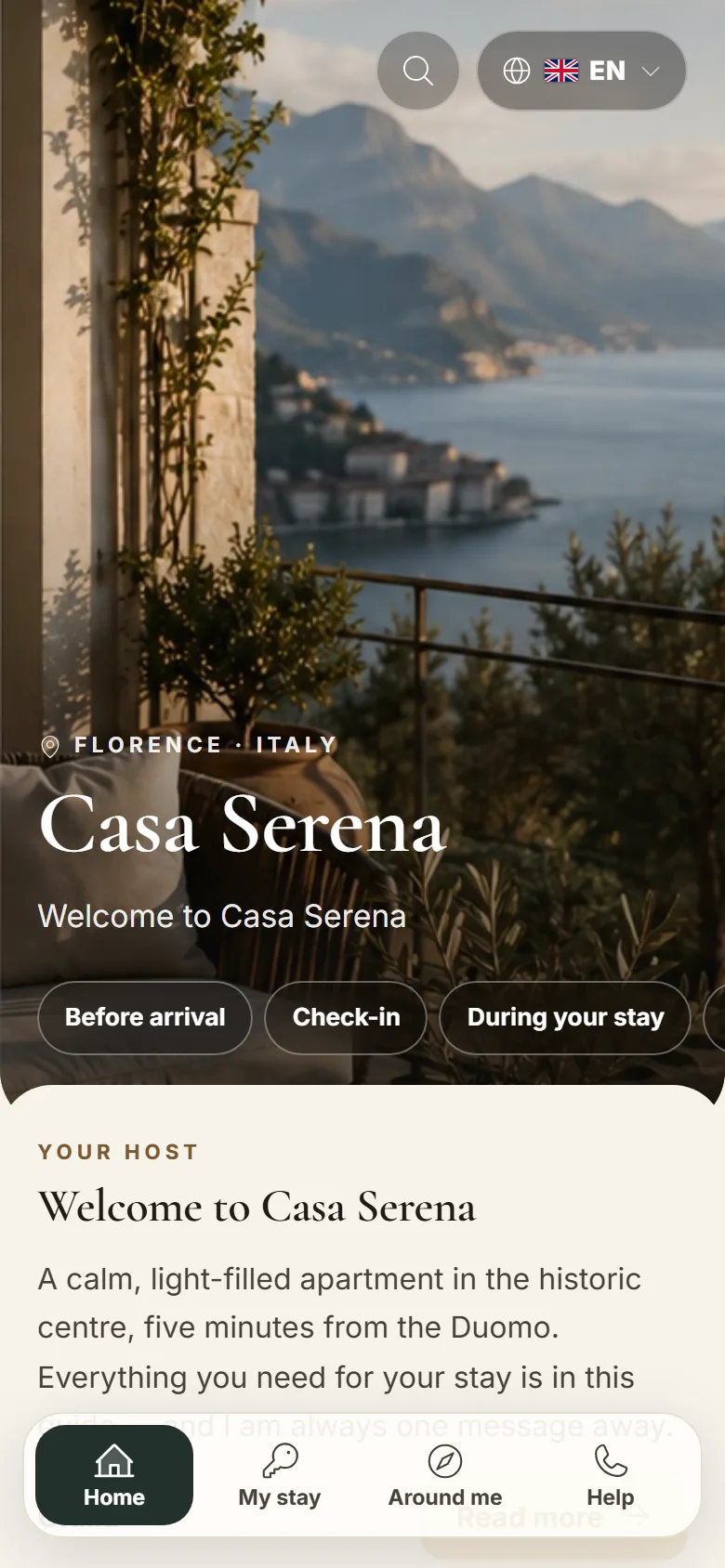
The Booking Planner runs the bookings and the numbers. The Guest Guide takes care of your guests during their stay: arrival, access, Wi-Fi, house information and local tips.
See your whole accommodation business in one planner
Start the free 14-day trial on the real Planner. No credit card.