Rooms and availability
A room occupancy planner that shows free and occupied rooms at a glance
When you work room by room, a grid is the quickest way to read availability. MAXORI puts every unit on a row and every stay across its dates.
Free 14-day trial · No credit card
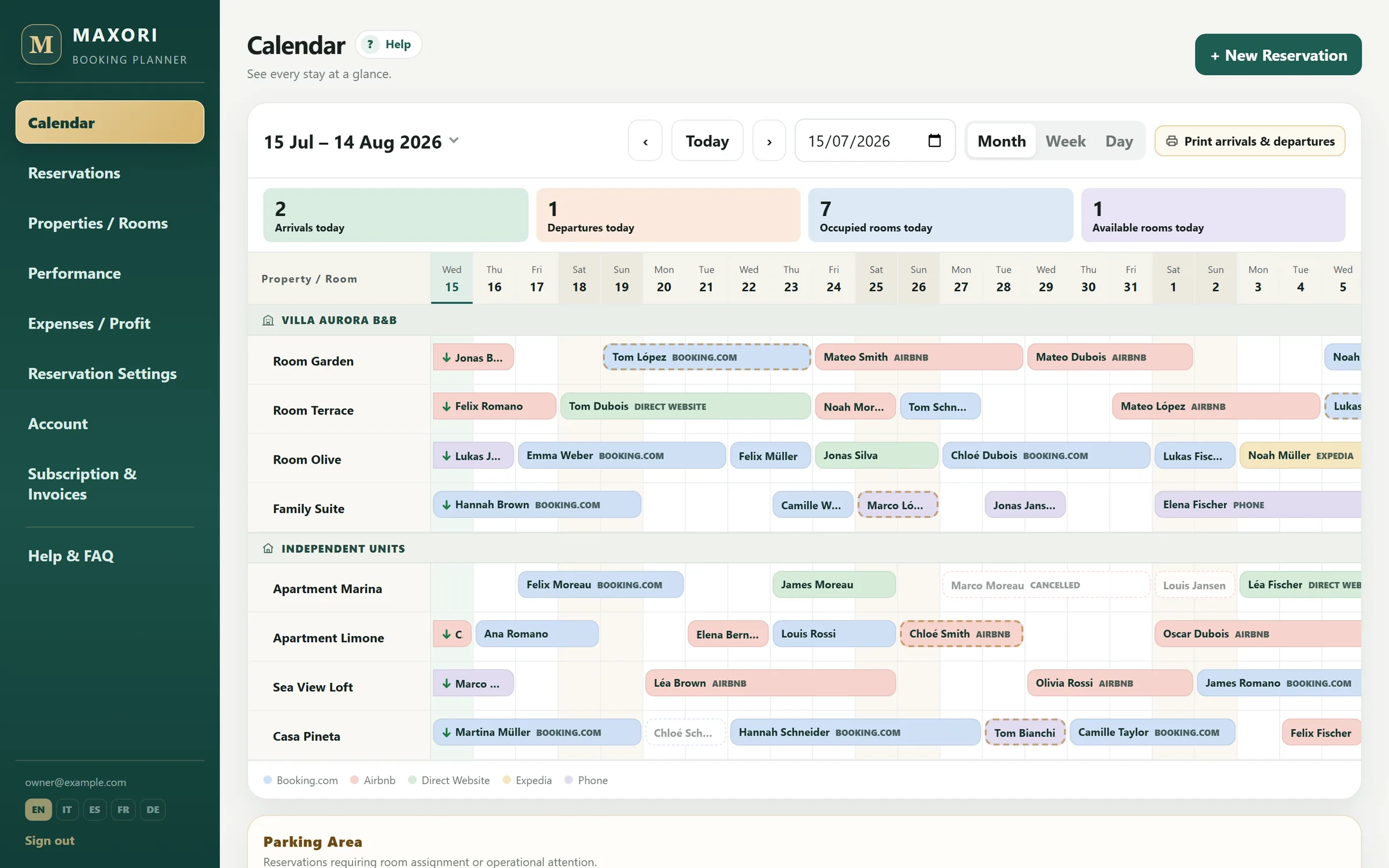
Real Planner screens with fictitious demo data.
One row for every room
Rooms and units are grouped by property and bookings sit on the dates of the stay.
Month, Week and Day
Change scale depending on the job: monthly overview, weekly detail or daily operation.
Overlaps do not save
A booking cannot be saved if it overlaps another booking on the same unit. The control applies to bookings present in MAXORI.
Example: check 6 rooms before accepting a request
When a four-night request arrives, Month view shows which rooms are free across the dates. If you try to save two overlapping stays on the same unit, the Planner blocks the overlap inside MAXORI.
Test it with real work
Use it for 14 days with your bookings
Create your units, enter a few real bookings and see whether the workflow is clearer than the system you use today.
Free 14-day trial · No credit card
What MAXORI does not do
- Overlap blocking only knows bookings stored in MAXORI; it does not control inventory on external OTAs.
- There is no Year view: the calendar provides Month, Week and Day.
Does MAXORI block two bookings on the same room?
Yes, when both bookings are stored in the Planner.
Can I see several rooms on one calendar?
Yes. Each unit has its own row.
Is there a Year view?
No. The available calendar views are Month, Week and Day.
Does the calendar update Booking.com or Airbnb?
No. MAXORI does not sync availability or rates with OTAs.
Try it with your own data
Free 14-day trial on the real Planner, no credit card. Enter a few bookings and test the workflow before deciding.